For agents

Answer client “what about this area?” questions on one map.

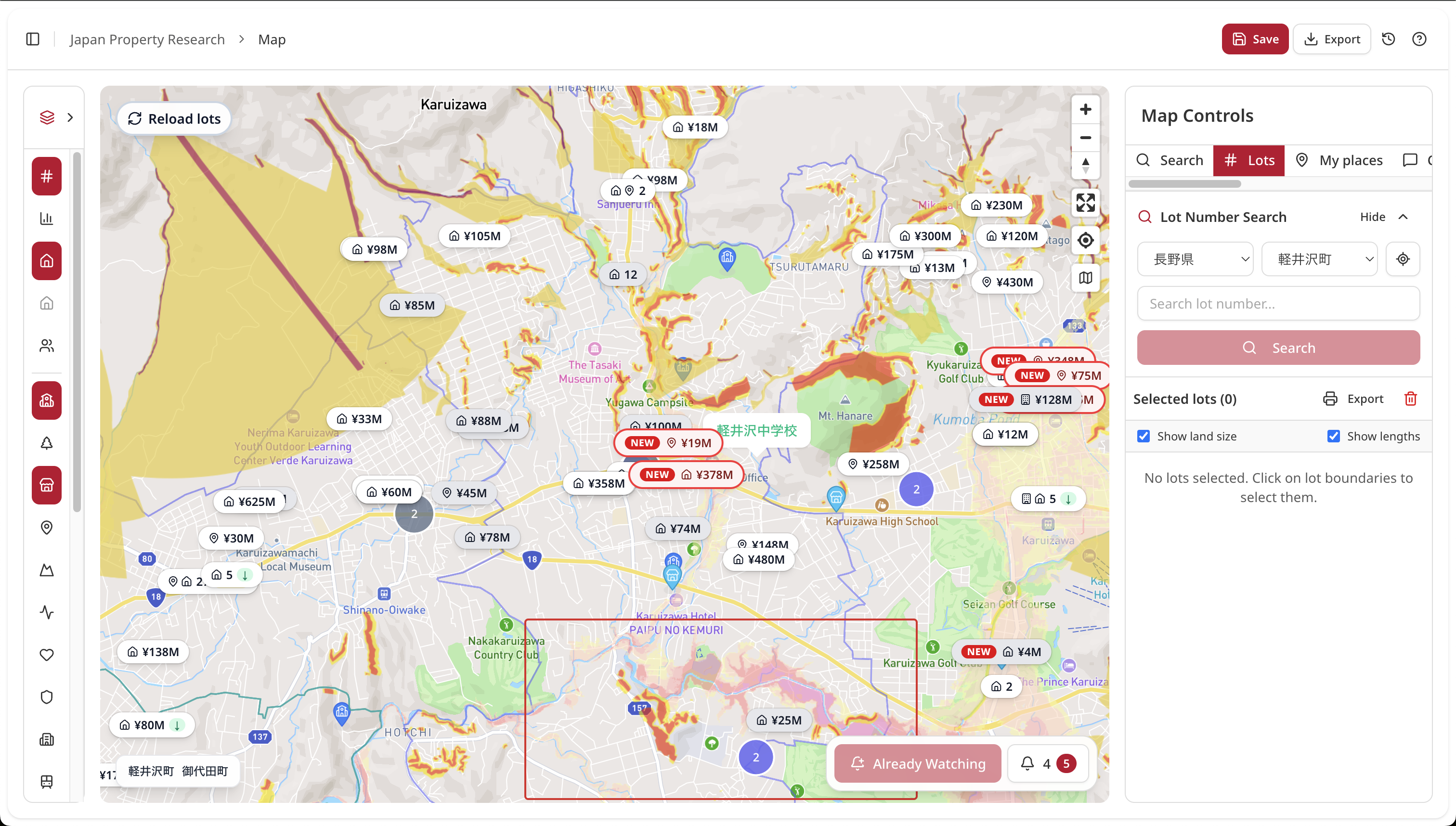
Overlay school zones, zoning, hazard maps, benchmark land prices, and active listings in one workspace across all 47 prefectures. Built for both client-facing proposals and back-office due diligence.

JPR map workspace with layered data

Two ways agents use JPR

Client-facing (advisory & sales)

  • Overlay client criteria live during first consultations
  • Compare school zones, zoning, and hazards side by side
  • Share map views with clients (PNG export supported)
  • Guide remote clients on the same map online

One plan supports both workflows.

Back-office (research & disclosure)

  • One consistent UI across all 47 prefectures for out-of-area deals
  • Review cadastral links, registry context, zoning, road access, and hazards in one view
  • Handle multi-parcel properties together
  • Use benchmark land price and roadside value layers for evidence-backed explanations
  • Use aggregated listings and Market Watch to cut routine multi-portal checking

One plan supports both workflows.

Do these situations sound familiar?

Out-of-area cases start slowly

Different municipal portals, formats, and update cycles mean half a day is gone before meaningful analysis starts.

With JPR: start immediately with one unified UI across 47 prefectures.

Proposal packs are manual

Zoning screenshots, hazard PDFs, school maps, and listing exports are collected from different tools and stitched in slides.

With JPR: layer data directly and export one PNG.

Too many tabs during client calls

Switching between tabs slows conversations and weakens confidence during live Q&A.

With JPR: answer in one screen with layer toggles.

Multi-parcel checks are time-consuming

Mixed land-use parcels need repeated cross-checks for map consistency, conversion constraints, and road access before disclosure.

With JPR: view parcel-level attributes together on one map.

Portal monitoring becomes repetitive admin work

Different listing portals update at different times, so teams keep re-checking multiple tabs to avoid missing changes.

With JPR: aggregated listings plus Market Watch keeps monitoring in one workflow.

Layer operations panel

Common layer sets

Client briefing: Listings + School zones + Hazards
Acquisition: Zoning + Road access + Land price
Disclosure prep: Cadastral + Hazards + Public benchmark

Data quality guide

  • Source normalized per prefecture where applicable
  • Update cycle differs by dataset (annual / daily / source-triggered)
  • Export options support client-ready handoff

Data layers available

  • 102M+ nationwide parcel records (official lot data)
  • 13 zoning-use categories
  • 25,500+ public benchmark land-price points (all 47 prefectures)
  • Roadside valuation layer
  • Hazards (flood, landslide, liquefaction, and more)
  • School district boundaries (elementary and junior high)
  • 450,000+ active listings (aggregated across multiple portals and local agency sites, refreshed daily)
  • Cadastral map and survey-map links
  • Urban planning context (location optimization, fire prevention zones, and more)
  • Registry-request workflow links

Concrete workflows

Buyer-side: first consultation

Overlay station walk-time, school-zone constraints, and budget to shortlist 3-5 options in-session.

Step 1: Toggle station walk-time radius and school-district boundary
Step 2: Add hazard layers and benchmark land price for budget reality check
Step 3: Export annotated PNG for client follow-up

Acquisition: owner proposal

Export zoning, FAR, and road-access context as PNG for proposal decks so owners can quickly grasp utilization options.

Step 1: Pull zoning, building coverage ratio, and floor area ratio for the parcel
Step 2: Layer road access conditions and adjacent benchmark land prices
Step 3: Export PNG with annotations for the proposal deck

Disclosure prep: faster research

Review cadastral links, zoning, hazard data, and benchmark prices in one screen and feed directly into draft disclosure documents.

Step 1: Open cadastral map and confirm parcel boundaries
Step 2: Stack hazard, zoning, and road-access layers for the lot
Step 3: Copy parcel attributes into the disclosure document draft

Plans for professionals

Free

Up to 5 research sessions per month, core layers, personal use

Pro (solo agent)

Unlimited research, PNG export, and commercial use. Contact us for pricing.

Team (multi-member agency)

Shared workspace, member seats, API access, contact sales

FAQ

Do you cover municipality-level differences?

Core public layers are normalized across all 47 prefectures. Municipality-specific planning layers are being expanded in phases.

How often is data updated?

Public benchmark prices update annually (March), hazards update when source data changes, registry flows are near real-time, and listings refresh daily. Listing data is crawled across multiple portals, including local real estate websites. This wording is provisional until final SLA sign-off.

How can we share maps with clients?

Use shareable URLs, PNG export, and PDF export.

Do you support API or CSV integration?

Available on Pro and Team plans (Developer API and MCP integration).

Can we use this with overseas clients?

Yes. It is browser-based and shareable via URL, with multilingual UI support.

Try it on one real case first.

Complete one property research cycle in JPR in about 5-10 minutes. Free-plan signup does not require payment details.